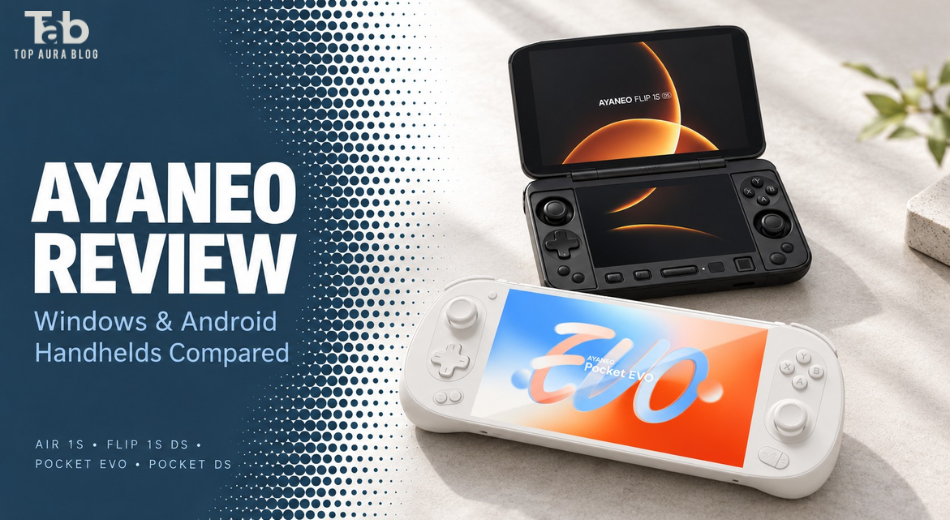
AYANEO Review: AIR 1S, FLIP 1S DS, Pocket EVO & Pocket DS Compared
-
October 13 , 2026
-
38
Introduction
AYANEO makes the kind of handhelds that encourage an immediate reaction: a tiny Windows gaming PC, an OLED Android device, or a clamshell with two screens. The harder question comes afterward will that design improve the games you actually play?
This AYANEO review compares four models with very different purposes: the AIR 1S, FLIP 1S DS, Pocket EVO, and Pocket DS. The most important distinction is easy to miss. Some AYANEO handhelds run Windows, while others run Android. That changes software compatibility, setup, performance expectations, and the meaning of value.
A beautiful Android handheld does not automatically replace a Windows gaming PC. Likewise, paying substantially more for a Windows model makes little sense if your main interest is Android games and streaming. We examine the features, practical compromises, current prices, customer feedback, and purchase conditions that help narrow the choice.
Review methodology: Official specifications, store listings, published policies, and selected owner accounts were checked on October 13, 2026. No devices were physically tested for this article. There are no invented frame-rate measurements, battery results, or personal unboxing claims.
What Is AYANEO?
AYANEO is a specialist gaming-hardware brand offering Windows and Android handhelds, alongside other computing products. Its official store presents a gamer-focused development philosophy and separates the two handheld platforms into distinct categories. Its appeal is breadth of design. Buyers can choose between compact conventional shapes and more unusual clamshell devices instead of accepting one standard handheld format. That variety also makes research essential. A favorable review of one model says little about another with a different processor, operating system, cooling system, or control layout. Treat AYANEO as a manufacturer with several product families, rather than a single device whose qualities can be summarized by one specification sheet.
Windows vs. Android: The First Buying Decision
The AIR 1S and FLIP 1S DS belong to AYANEO’s Windows range. Pocket EVO and Pocket DS belong to its Android range. For buyers, this creates two different questions. A Windows handheld is relevant when you want to install compatible PC games locally and use desktop gaming software. You still need to check game requirements, controller support, and any launcher restrictions. An Android handheld is relevant when Android applications, supported emulators, and streaming services are the priority. It should not be purchased on the assumption that desktop Windows games install and run in the same way.
Streaming adds another distinction: the game runs elsewhere, while the handheld receives the video and sends your inputs . A favorable streaming experience therefore depends on more than the handheld’s processor. Choose the platform before choosing RAM, storage, or color.
Key Features: What Matters in an AYANEO Handheld Review?
Display Quality and Refresh Rate
The models reviewed offer OLED displays, but their sizes and refresh capabilities differ. The FLIP and Pocket dual-screen designs also pair their main display with a different secondary panel. The practical value of a display depends on your games. Readable text may matter more than refresh rate in a strategy game. A large screen can improve visibility, while a smaller screen may make the device easier to carry. A high-refresh panel does not guarantee that a demanding game reaches that frame rate. Assess the complete experience rather than treating the largest refresh-rate number as a performance result.
Controls and Ergonomics
Control layout deserves as much attention as processing power. Consider where your thumbs sit, how you reach the triggers, and whether the D-pad suits the genres you play. Fighting games, racing games, and turn-based titles place different demands on controls. Magnetic joystick technology can be an appealing hardware feature, but it does not establish the quality of every button or eliminate all possible faults. There is no hands-on comfort assessment here. Product dimensions and photographs help narrow the choice; they cannot fully predict how a device will feel after a long session.
Cooling and Power Settings
These handhelds use active cooling, with model-specific designs and performance settings. The buying question is how much performance you need away from a power outlet. Increasing power can improve performance in some workloads, but it also increases the amount of heat the device must manage. Maximum settings should not automatically be your default. A quieter, lower-power configuration may be more enjoyable for an older game than chasing an unnecessary frame-rate target.
Software and Dual-Screen Utility
AYANEO promotes its own management software and additional controls for dual-screen models. Its Pocket DS launch material also identified some functions as still under development at that time. That makes current software verification important. Buy a device for functions confirmed to work in the version available to you. A promising update roadmap is useful context, but it should not carry the same weight as a feature you can use immediately.
First Impressions: Design, Packaging, and Setup
AYANEO’s product presentation places considerable emphasis on appearance and distinctive hardware. That is part of the attraction, particularly for buyers who enjoy collecting or exploring unusual devices. However, premium-looking photography cannot establish hinge longevity, fan noise, button consistency, or manufacturing reliability. Packaging quality was not assessed firsthand. Once a device arrives, check the order configuration, included accessories, charging behavior, screens, controls, and wireless connectivity promptly.
Setup depends on platform. For Windows, expect operating-system updates, game installation, and control configuration. For Android, account setup, application installation, and controller mapping may be relevant. The best first test is a small selection of games you already know. Testing your actual library is more useful than spending the entire return window comparing menus or running synthetic benchmarks.
AYANEO AIR 1S Review: Compact Windows Gaming
The AIR 1S prioritizes a small Windows-handheld format. AYANEO’s original launch described a 5.5-inch device with a 38Wh battery, while the current product presentation identifies a Ryzen 7 8840U version and a standard-edition weight of approximately 450g. Importantly, AIR 1S listings can refer to different generations. The original used a 7840U processor, while a later update introduced the 8840U. Confirm the exact unit instead of relying on the family name. For this AYANEO AIR 1S review, the strongest buying case is portability. Someone who avoids carrying a larger handheld may find a compact device more useful despite its compromises.
The main trade-off is visibility. Dense interface elements and small text deserve attention on a smaller screen. Hand size also matters: compact dimensions do not guarantee comfortable control spacing. Battery endurance was not measured here. Do not confuse a compact chassis with a promise of long sessions in demanding games. Buying assessment: Worth considering when compact Windows gaming is the specific goal. Less persuasive if screen size and unplugged endurance are your leading priorities.
AYANEO FLIP 1S DS Review: Two Screens With Windows Flexibility
The FLIP 1S DS combines a clamshell design with Windows. Official launch information lists a 7-inch 1080p 144Hz OLED main display, a 4.5-inch secondary display, and processor options including the Ryzen AI 9 HX 370 and Ryzen 7 8840U. The current store listing reviewed presents HX 370 configurations. That illustrates why launch specifications and a purchasable configuration should be checked separately. Its appeal is a second screen that could support a useful task alongside gaming. The right buyer already knows what that task will be.
A second display does not automatically make every game better. It adds hardware, positioning decisions, and software management. If you rarely use it, the purchase becomes harder to justify. This AYANEO FLIP 1S DS review did not include testing of the hinge, thermal comfort, or game performance. Buying assessment: A specialist choice for enthusiasts who want Windows and genuinely useful dual-screen functionality. A conventional handheld deserves comparison if your games need only one display.
AYANEO Pocket EVO Review: A Large-Screen Android Option
Pocket EVO is an Android handheld built around the Snapdragon G3x Gen 2 platform. AYANEO lists a 7-inch 1080p OLED display with up to 165Hz refresh and an 8,600mAh battery. The clearest attraction is a large single-screen layout without the additional complexity of a clamshell. For Android gaming, check controller support and application compatibility. For emulation, investigate the exact systems and titles you intend to use rather than assuming a powerful chip guarantees every result.
There is also a relevant hardware-history detail. In January 2025, AYANEO announced a thermal enhancement and said shipments from January 8 incorporated it. Older or second-hand units warrant clarification about their revision and support history. That announcement should not be turned into a universal claim that every unit is defective or that all concerns are resolved. Buying assessment: Relevant for buyers who want a large OLED Android device and can verify compatibility and the condition of the unit offered.
AYANEO Pocket DS Review: Android With a Dual-Screen Purpose
Pocket DS is the Android clamshell in this comparison. Official specifications describe a Snapdragon G3x Gen 2 platform, a 7-inch 1080p 165Hz OLED main panel, a 5-inch 1024 × 768 LCD secondary panel, and an 8,000mAh battery. Its strongest use case is gaming or multitasking that benefits from two physical displays. For a dual-screen game, that arrangement can be more appealing than fitting both views onto one panel. However, the software still needs to handle display placement, touch input, and controls correctly.
For this AYANEO Pocket DS review, the recommendation is to verify the current emulator and firmware combination you plan to use. Display specifications alone cannot establish compatibility. If your library consists mostly of ordinary single-screen Android titles, consider whether the second screen earns its additional complexity. Buying assessment: Worth investigating for a defined dual-screen interest. Less compelling when novelty is the main reason for buying.
Performance and Real-World Expectations
PC Games: Evaluate Settings, Not Just Processors
Windows handheld performance depends on the game, power limit, resolution, graphics settings, drivers, and processor configuration. No measured frame rates are presented here. A processor name alone would not justify them. Before buying, look for testing of your target games on the same configuration. A smooth result at reduced resolution may be entirely satisfactory on a handheld, but it should be understood as a compromise rather than desktop-equivalent performance.
Android Gaming and Emulation
For Android, compatibility can be more important than headline power. Check whether your applications recognize physical controls and support the device’s platform. For emulation, evaluate current software and individual games. A system-level statement such as “supports 3DS” is too broad to guarantee every title. Games, subscriptions, and streaming services are separate purchases unless explicitly included in an offer. Do not assume the handheld arrives with your desired library.
Battery, Heat, and Long Sessions
A useful battery assessment needs an identified workload and settings. Maximum brightness, additional displays, demanding games, and wireless streaming create different conditions. Battery capacities expressed in mAh and Wh should not be compared directly without accounting for voltage. More importantly, neither figure alone establishes runtime. For long sessions, consider where heat reaches your hands and how often you will need to charge. Those practical limits may matter more than short benchmark peaks.
Pricing and Value Analysis
These USD prices and availability indicators were displayed in the official shop when checked on October 13, 2026:
| Model | Displayed starting price | Listing status observed |
|---|---|---|
| AIR 1S | No current purchase price verified | Obtain a configuration-specific quote |
| FLIP 1S DS | $1,499 | Sold out |
| Pocket EVO | $499 | Sold out |
| Pocket DS G3x Gen 2 | $579 | Add-to-cart option displayed |
Starting prices do not apply to every configuration. Availability can change. Avoid using historical crowdfunding prices as current retail prices. An early-bird offer can differ substantially from today’s purchasable configuration. The Pocket DS listing is $80 above the EVO’s displayed starting price. The FLIP 1S DS is $920 above the Pocket DS, but the latter comparison crosses operating systems and hardware categories.
When Is the Premium Justified?
AYANEO’s premium is easiest to justify when its form factor solves a particular need: compact Windows gaming, a large Android OLED screen, or useful dual-screen play. It is harder to justify when a less expensive device already handles your library satisfactorily. Higher RAM and storage are worthwhile only when they serve your workload. Choose capacity around the games and applications you use, rather than buying the largest configuration automatically.
Shipping, Warranty, and Returns
The store warns that taxes and duties are excluded from the displayed payment amount. Include those charges when comparing offers. AYANEO’s knowledge base describes a one-year maintenance warranty for qualifying failures, with exclusions. Published return pages describe a seven-day window and restrictive conditions. The detailed policy specifies that non-defective returns must remain unactivated and can involve customer-paid shipping and transaction fees. Another page excludes sale items. Confirm the terms applicable to your seller and order before purchase.
Pros and Cons
| Pros | Cons |
|---|---|
| Distinctive conventional and clamshell designs | Premium prices |
| Separate Windows and Android choices | Similar names can obscure major differences |
| OLED options across the reviewed models | Screen specifications do not guarantee game performance |
| Compact Windows option in the AIR family | Smaller screens can make text harder to read |
| Dual screens can serve specific libraries | Compatibility and configuration still require work |
| Published support documentation | Restrictive returns and variable availability |
Who Should Buy AYANEO?
AYANEO is most relevant to buyers who understand their software needs and want a particular design unavailable in the alternatives they are considering. It may also suit enthusiasts who enjoy configuring handhelds and are willing to troubleshoot when an application or control mapping needs adjustment.
| Buyer priority | Model to investigate |
|---|---|
| Compact Windows handheld | AIR 1S, after verifying generation |
| Windows with useful dual-screen tasks | FLIP 1S DS |
| Large single-screen Android experience | Pocket EVO |
| Android dual-screen gaming | Pocket DS |
| Simple first handheld purchase | Compare mainstream alternatives first |
Who Should Avoid It?
Skip AYANEO if you want a guaranteed, configuration-free experience across every game. It is also a weaker choice if an international repair or restrictive return process would create significant difficulty. Buyers seeking straightforward value should establish why the chosen AYANEO is better for their library than a conventional alternative. Without that reason, unusual hardware can become an expensive distraction. If you mainly want Android gaming, paying Windows-handheld prices is unnecessary. If you need native PC gaming, an Android model is the wrong starting point.
Customer Feedback: What Do AYANEO Reviews Show?
Selected owner accounts show enthusiasm for screens, finish, and distinctive design alongside concerns about controls, heat, and software. One FLIP 1S DS owner praised the displays but criticized the D-pad and thermal comfort. Their update reported that firmware resolved an optical-input problem important context when reading the original complaint. A Pocket DS owner praised presentation and controls while describing software and compatibility difficulties. Other participants in the same discussion reported more favorable experiences. These are individual accounts, not a representative reliability study. The practical lesson is to prioritize recent feedback about the exact model and software version. Older AYANEO reviews may describe faults or limitations changed by updates, while praise for another product family may be irrelevant.
Competitor Comparison
| Alternative | Platform | Main reason to compare |
|---|---|---|
| Steam Deck OLED | SteamOS | A Steam-focused handheld with trackpads |
| ROG Xbox Ally X | Windows | A conventional Windows handheld alternative |
| AYN Odin 2 | Android | A different Android gaming platform and design |
| AYANEO FLIP 1S DS | Windows | A deliberate dual-screen Windows choice |
| AYANEO Pocket DS | Android | A deliberate dual-screen Android choice |
Valve lists the Steam Deck OLED with a 7.4-inch display, up to 90Hz refresh, and integrated trackpads. ASUS identifies the ROG Xbox Ally X as a Windows handheld using the Ryzen AI Z2 Extreme. AYN lists the Odin 2 with a Snapdragon platform, Android, and a conventional single-screen layout. These are platform and design comparisons, not head-to-head benchmark results. Compare current regional prices and support before choosing.
Frequently Asked Questions
1. Is AYANEO worth it?
It can be worthwhile when a specific model’s platform or design matches your needs. The premium is less convincing if a simpler alternative already serves your library.
2. Do all AYANEO handhelds run Windows?
No. The reviewed AIR 1S and FLIP 1S DS are Windows devices; Pocket EVO and Pocket DS are Android devices.
3. Can Pocket EVO run my Windows Steam games locally?
Do not assume so. It is an Android handheld. Streaming PC games is a separate approach from installing and running them as on Windows.
4. Which AIR 1S processor should I expect?
Listings can refer to 7840U or later 8840U versions. Verify the processor and edition for the exact unit offered.
5. How does FLIP 1S DS differ from Pocket DS?
FLIP 1S DS is a Windows gaming PC. Pocket DS is an Android handheld. Their similar clamshell concept does not make them interchangeable.
6. Does 165Hz mean every game runs at 165fps?
No. Refresh capability and game frame rate are different. Results depend on software, workload, settings, and display mode.
7. Is dual-screen emulation guaranteed?
No. Check the emulator, game, controls, and current firmware combination. Two physical displays alone do not establish compatibility.
8. How long does the battery last?
No independent runtime was measured for this review. Battery life depends on the model, workload, brightness, power settings, and active screens.
9. Can I return a handheld after testing it?
Do not assume an unrestricted trial. Published policies describe a short window and conditions involving activation or use. Confirm eligibility beforehand.
10. What should I check before buying?
Verify the exact configuration, game compatibility, stock status, total delivered cost, warranty arrangements, and return terms.
Final Verdict: Is AYANEO Worth It?
AYANEO is most compelling when you want something specific: an unusually compact Windows PC, a large Android OLED handheld, or a dual-screen device with a clear purpose. The AIR 1S deserves consideration for portability. FLIP 1S DS targets specialist Windows use. Pocket EVO is the simpler large-screen Android concept, while Pocket DS is more relevant to buyers who will actively use both displays. Shoppers seeking the easiest first handheld or straightforward value should compare mainstream alternatives before committing.
Final editorial rating: 7/10. Distinctive and potentially rewarding hardware, with enough configuration and purchasing complexity to favor informed enthusiasts.
Leave a Reply
Your email address will not be published. Required fields are marked
Can I write you?
Sign up to get my weekly newsletter.